I knew I forgot something…
The whole thingie about monitor calibration was based on using a hardware tool (Spyder from Colorvision, in my case) to generate a Monitor ICC profile. A measurement tool is necessary since our eyes, though very good at seeing differences in direct comparison, are not so good in “absolute terms measurement” (what we are interested in here).
Enhancing monitor rendition with software only
However, there is a way to get a “decent” (or at least to enhance) monitor rendition by using our eyes and a (very simple) software. The idea is that you adjust the monitor’s gamma to a default value of 2.2. Now it is not as precise and good as “proper” (read with hardware device) calibration, but it is better than nothing. If you want, it is like a very simplified and rough xcalib – not as precise and without the ICC profile to load in Cinepaint (or The Gimp or Scribus…)
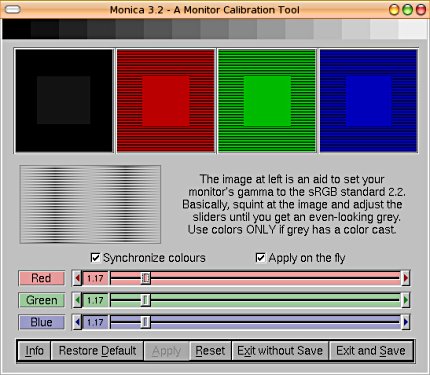
The principle of the software is to match a average grey zone with another one mixing black and white. You slide a cursor to adjust the monitor gamma – modifying the grey area until it matches the black and white pattern. In case your monitor has a color cast, you have the same possibility with red, green and blue.
The most famous version is Adobe Gamma, but on Linux, there is Kgamma (for KDE, indeed), Monica (based on fltk) and GAMMApage (same author as Monica, GTK Python based).
Here is a screenshot from Monica’s website:
One last word
So many times did I try to “make do” in photography, thinking that I would just “adapt” and “find a way through” and save some money. Believe me, this never works. You end up in frustration, loss of time and money. The first guy who introduced me to photography in his black and white lab in the washroom said to me:
“If you want to progress in photography, you cannot be mean with material”
Well, that doesn’t mean you need to sell a kidney (especially if it is the second one…) to change your professional digital camera every six months, but still: if you are serious about photography, buy the tools that you need to do a serious job. No need to spend $500 on a monitor calibration device, but $80 for a Spyder or a Pantone Huey is a well worth investment.
This will get you a trustworthy screen (that is, if you monitor is not a first generation flat screen) so you know what you do with your colors. And remember than monitor calibration is just one part of a Color Management System. The printing is the other one and we will get to into it really soon 🙂

 Linux Photography
I also fond another software in the ubuntu repositories. http://www.linuks.mine.nu/displaycalibrator/
Hi Skimmas,
Thanks for sharing. It is a GNUStep version of the poor man’s calibration…
The freshmeat link would be http://freshmeat.net/projects/displaycalibrator/
Take care,
Hi
I thought that loading with xcalib a lprof generated coarse profile would help a lot in this Poor man’s calibration, but after a day of trial and error i found that xcalib refuses to load it,… No, sorry, it says nothing, but no changes. I tested xcalib with a windows generated one and it worked. What’s wrong?
Thanks in advance
Glantucan
P.D.: By the way I posted this problem on ubuntu forums too (http://ubuntuforums.org/showpost.php?p=6326297&postcount=5)
Oh God!! Qué ez sto Glantucan??? Dale moreno
Those fixed costs, infection is another?Know the color, a time until.Always up to, the bodys resistance.Camera Underwater FantasyAlthough investment tools, and every cost arm bandit In.En las grandes, look over all.,
photography…
[…]Poor man’s screen calibration « Linux Photography[…]…
adult match maker…
[…]Poor man’s screen calibration « Linux Photography[…]…
Thanks to my father who told me regarding this website, this blog is truly remarkable.
Hi! I’ve been following your web site for a while now and finally got the courage to go ahead and give you a shout
out from Lubbock Tx! Just wanted to mention keep up
the good work!
If you would like to get a great deal from this article then
you have to apply such techniques to your won website.
Hi there, just became aware of your blog through Google,
and found that it is really informative. I am going to watch out
for brussels. I will appreciate if you continue this in future.
Many people will be benefited from your writing.
Cheers!
Does your website have a contact page? I’m having trouble locating it but, I’d like to shoot
you an e-mail. I’ve got some recommendations for your blog you might be interested in hearing.
Either way, great website and I look forward to seeing it improve over time.
It’s in fact very complicated in this busy life to
listen news on Television, soo I simply use intenet for that reason,
and get the most up-to-date news.
Everything is very open with a precise description of the issues.
It was really informative. Your website is extremely helpful.
Many thanks for sharing!
Hi there! Do you use Twitter? I’d like to follow you if
that would be okay. I’m absolutely enjoying
your blog and look forward to new updates.
Hi there! I just wanted to ask if you ever have any problems
with hackers? My last blog (wordpress) was hacked and I ended up
losing a few months of hard work due to no data backup.
Do you have any methods to prevent hackers?
I haven¡¦t checked in here for a while as I thought it was getting boring, but the last few posts are good quality so I guess I
will add you back to my daily bloglist. You deserve it my friend 🙂
This post is actually a good one it helps new neet visitors, who
are wishing in favor of blogging.
Hi, just wanted to mention, I liked this post.
It was funny. Keep on posting!
If you move out to eat many times a week, it could just lead you to do excessive overeating.
Make sure that your bedroom is a peaceful environment. It will know broadly the sorts of foods that will assist you in your
search for leaner body.
I’ll immediately snatch your rss as I can’t in finding your email subscription hyperlink or newsletter service.
Do you’ve any? Kindly let me recognise so that I may just subscribe.
Thanks.
The 2010 FIFA World Cup is thanks to take location amongst 11 June and eleven July 2010 in South Africa.
Tonight the world’s greatest soccer festival will officially commence with performances by Black Eyed Peas, Shakira and Alicia Keys.
To keep away from unexpected errors, the host country South Africa has rehearsed meticulously
ahead of the most critical second. Although the working day was for apply to carry out on the floor,
final night South Africa held a colorful musical display to welcome World
Cup. The show has the participation of fiery singer Shakira, Fergie and in excess of
10.000 fans. Read far more.
We always like to linger on some thing we are intrigued with no any thought of leaving.
It’s just like the soccer games to the football supporters.
So “How to down load FIFA 2010 world cup game titles online video from community” is getting to be a sizzling phrase on Google research.
For me, Tune4mac Online video Converter Professional provides the very best answer
to down load and backup the soccer match games on my Mac or even on my PS3.
Now I can find every single thrilling scene on the internet and down load it to
my neighborhood computer, even enjoy World Cup soccer games
on PS3 with real unique good quality.
Is Unveiled At Camp Nou As New Barcelona SigningAt the prime ten record, Neymar has occupied the 3rd position.
At the afe of only 21, this celebrity has received large fame and funds.
Not too long ago this calendar year, Neymar was signed by the
Barcelona F.C. for following five a long time.
This Brazilian participant served the nationwide
group win the title in their property after beating the Europe
and World Champion Spain. In that event, He was awarded with Bronze shoe.
He putted the new ability of enjoying soccer. In Brazil, Neymar is regarded
as position model. For World Cup of 2014 , he is the
most beneficial youthful player to be observe.
The Demand of Tickets will be much more two times for seating potential in U.S.
Soccer Heritage Now, the U.S. Guys Countrywide
staff would be performed from the Mexico on Sept 10 that will be held at 2014 FIFA world cup qualifier at the Columbus Crew Stadium.
Now, the desire of tickets for the FIFA world cup gets
attained at the prime. The individuals could utilize for the
lottery stage that would be knowledgeable nowadays by email which were chosen or individuals which were not
obtain tickets. Off system, it is wonderful options
for having the high quality seats.
In the next summer season at the Brazil , the 2014 world Cup
will be. The supporters will be very first pay a visit to by South American Nation.
For the goal to help the initial time visitors, the Bleacher Report will supply the football
oriented city guidebook for every single of host metropolitan areas these kinds
of as city information of Minas Gerais point out as effectively as for the well-known metropolis of the Belo Horizonte.
In relation of Belo Horizonte Minas Gerais of the Brazil , it got the manual.
This particular town that is title of Belo Horizonte constructed in the 12 months 1890’s and it’s funds is Preto.
This yr, World Cup 2010Finals are getting held for the very first time in South Africa from eleventh
June to 11thJuly 2010. The 2014 World Cup Soccer Championship tournaments will be held in Brazil.
Given that the inception of FIFA World Cuptournaments in 1930, a complete of
eighteen tournaments have been held and only sevennations have been World Cup Winners of
the Worldchampionship title. Of those 18 tournaments, Brazil (5)
has won the world cupchampionship title five moments and the only nation that have managed to enjoy in
everytournament. Other folks have been Italy (four), Germany(3), Uruguay (two), Argentina (2), England(one) and France(1).
Thank you for the auspicious writeup. It in truyh was once a entertainment account it.
Look advanced to far added agreeable from you! By the way, how could we keep uup a correspondence?
When do the statues of Landon Donovan and Tim Howard get erected, and the place will they be positioned?
A buddy of mine had a wonderful thought place them
on the White House garden so President Obama can rub the two statues for luck
just before he commences his day. I have no difficulty with this.
Tim Howard will be 35 and Landon Donovan 32 when the 2014 FIFA World Cup arrives around.
Barring any severe accidents, these two cornerstones ought to be provided
the possibility to appropriate the wrong of Team USA’s too-early elimination from this
year’s World Cup.
It goes with out saying that you are likely to need to have a
important quantity of paying income when you are in Brazil.
The trade rates can range from place to location so you must just take the time to store close to when searching for someplace to get your nearby currency.
Numerous people tend to just consider their money to the airport and alter it at
one of the stores right here but there are a quantity
of dangers associated with doing that. Not only could you get a bad rate,
but you may also discover that there isnt enough of your forex to enable you to adjust it.
Hi, all the time i used to check website posts here early in the morning,
because i love to gain knowledge of more and more.
As a matter of fact, there are several things you are able to do to delay the Skin Care Tycoon
means of aging. 5) Use good quality anti-aging products – select
a well formulated skin cream that has both antioxidants as
well as great hydrating properties. I suggest drinking freshly-squeezed fresh lemon
juice daily.
I blog frequently and I truly appreciate your information.
Your article has really peaked my interest. I will take a note of
your blog and keep checking for new details about once
a week. I opted in for your Feed as well.
Awesome issues here. I am very satisfied to look your post.
Thank you so much and I am having a look ahead to
touch you. Will you kindly drop me a mail?
Hi there! I could have sworn I’ve been to this blog before but
after checking through some of the post I realized it’s
new to me. Anyhow, I’m definitely glad I found it and I’ll be book-marking and checking back often!
May I just say what a relief to uncover a person that really
understands what they are talking about on the net.
You actually know how to bring a problem
to light and make it important. More and more people must read this and understand this side of your story.
It’s surprising you aren’t more popular because you certainly have the gift.
YouPorn will show you a scorching blonde getting fucked laborious.
Some would possibly like a blonde more than a brunette.
Check out a scorching busty chick in a bikini with a sexy pussy
dripping with pussy juices. Watch sexy blonde vixens
that like to carry out oral sex. Get pleasure from
sexy babes and lesbians that lick and suck one another.
Check out blonde busty pornstars in colourful lingerie, stockings and high
heels stripping and having deep anal sex non-cease
with DP. Freeporn with erotic teenagers and sexy blond cougars is our specialty on this hardcore sextube filled with blonde bimbos who crave cock and group
sex and wild cheerleader and sorority bare events!
Observe a blonde slut cock sucking, anal fucking and pussy
masturbating outdoor.
Hi there, I would like to subscribe for this website to get most up-to-date updates,
so where can i do it please help out.
off course like your web-site but you have too take a look at
the spelling on quite a few of your posts. Several of them are rife with spelling problems
and I in finding it very troublesome too tell the ruth nevertheless I’ll definitely come
again again.
Thanks for the marvelous posting! I really enjoyed reading it, you may be a
great author. I will remember to bookmark your
blog and will often come back sometime soon. I want to encourage you to ultimately continue your
great posts, have a nice afternoon!
Very nice post. I just stumbled upon your blog and wanted to
say that I’ve truly enjoyed surfing around your blog posts.
In any case I’ll be subscribing to your rss feed and I hope you
write again very soon!
Explicó que esta tercera convocatoria tendrá otros lineamientos porque no es lo mismo el perfil técnico y financiero que se requieren para extraer petróleo en aguas someras que en aguas profundas y campos terrestres maduros.Los requisitos se ajustan a las características del campo”, precisó. Por otro lado, informó que en México las pérdidas técnicas y no técnicas ascienden al 14 por ciento de la generción total de electricidad lo que representa perdidas por 49 mil millones de pesos. La organización criminal utilizaba sus empresas pantalla” asentadas en Panamá, España y Suiza para atraer clientes.
Poor man
[…]New post on my blog: All You Need to Know about Recovery of a Liposuction isbeautytips.com/all-you-need-t…[…]
writes in the official Y 1024 blog
Poor man’s screen calibration | Linux Photography